Upload a profile photo
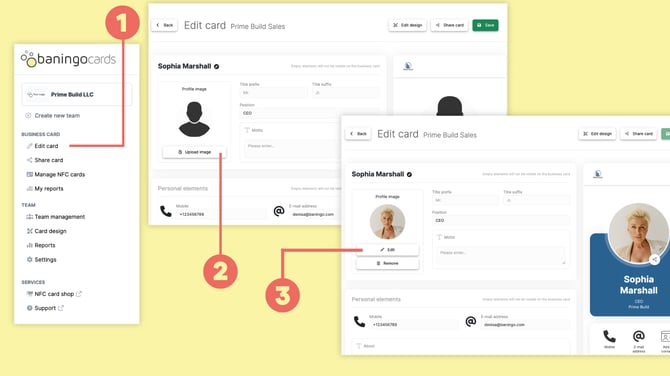
Open Edit card (1).
If you don't have a profile photo yet, click Upload image (2) under Profile image and select an image from your device.
Adjust your photo
After uploading your image, you can adjust how it is displayed.
You can:
- Drag and drop: Move the image within the frame to change its position.
- Zoom: Zoom in or out until the image is framed correctly.
Once you're happy with the result, confirm your image change.
Edit or remove your photo
If you already have a profile photo, use the options below the image (3).
Select Edit to replace or adjust your existing photo.
Select Remove to delete the photo from your digital business card.
Click Save when you're finished.