
Create a Company element
Open Card design for the team you want to edit.
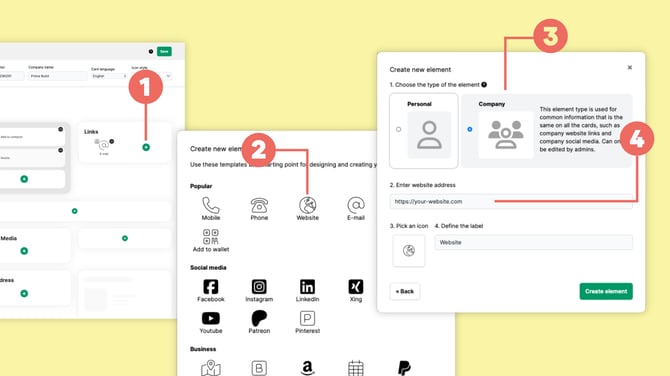
Click the + icon (1) where you want to add the element.
Choose the type of element you want to add. For example, select Website (2) to add your company's website.
Choose Company (3) as the element type.
Enter the company information, such as the website URL (4).
Click Create element and save your changes in Card design.
The information will then be managed centrally for the team instead of being entered separately by every team member.
Who can edit Company elements?
Company elements can only be created, changed or removed by administrators.
Team members see the Company information on their digital business cards but cannot change it themselves under Edit card.
Company elements are particularly useful for information that should be consistent across the whole team, such as:
- company website
- company social media profiles
- company contact details
- company-wide links