
Share via link
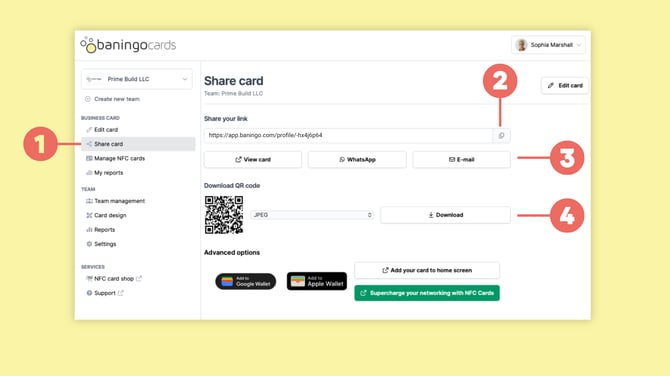
Open Share card (1).
Under Share your link, click the copy icon (2) next to your personal URL to copy the link to your clipboard.
You can paste this link into emails, messages, your email signature or anywhere else you want to share your digital business card.
You can also use the available sharing buttons (3) to:
- open your digital business card via View card
- share it via WhatsApp
- send it using E-mail
Share via QR code
You can also share your digital business card using your personal QR code.
Open Share card (1).
Under Download QR code, choose the preferred file format and click Download (4).
You can use the downloaded QR code in places such as:
- email signatures
- presentations
- printed materials
- virtual meeting backgrounds
- websites
For in-person sharing, you can also display your QR code directly on your smartphone so the other person can scan it.
Share via NFC card
If you use a baningo NFC business card, simply hold or tap the card near a compatible smartphone.
The recipient receives a notification and can open your digital business card in their browser.
For more information about NFC cards and compatible devices, see our NFC cards guides.
Share via Apple or Google Wallet
You can also add your digital business card to Apple Wallet or Google Wallet.
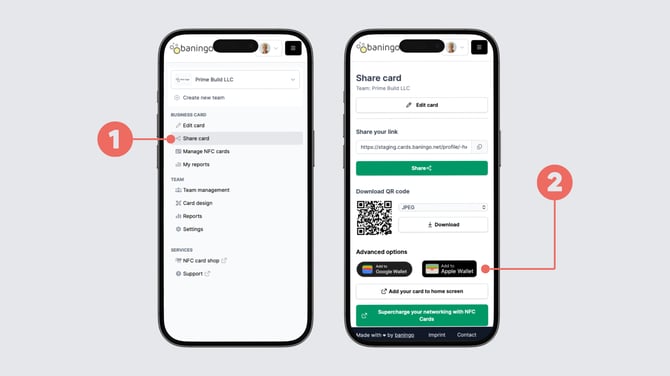
Open Share card (1) and scroll to Advanced options.
Select Add to Apple Wallet or Add to Google Wallet (2) depending on your device and follow the instructions on your smartphone.
Once added, you can quickly open your Wallet card and show its QR code when you want to share your digital business card.
For detailed instructions, see How to add your digital business card to Apple Wallet or Google Wallet.
Does the recipient need an app?
No.
Neither you nor the person receiving your digital business card needs to install an app to use baningo cards.
Digital business cards open directly in a web browser such as Safari, Chrome or another modern browser.
This means you can share your card with anyone using a compatible smartphone, tablet or computer.