
Overdue subscription
If your subscription is overdue, first check whether your payment method is still valid and up to date.
Open Billing (1).
Click Payment Methods & Billing History (2) to review or update your payment method.
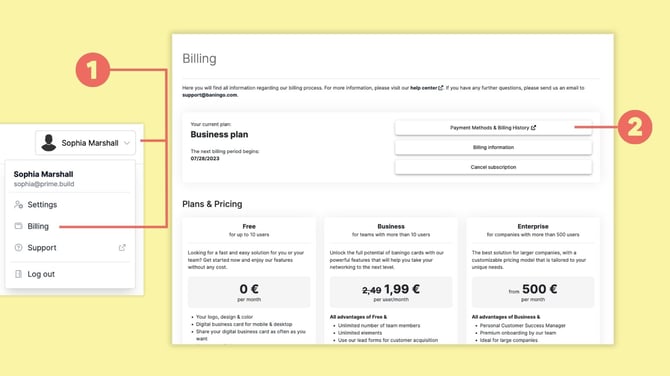
If an overdue invoice is displayed in Billing, follow the available payment option to settle the outstanding invoice by clicking Pay overdue invoice.
Payment declined
If a payment fails or is declined, our system will automatically attempt to retry the payment up to three times, every 7 days after the initial due date.
If all payment attempts fail, your subscription will be suspended and your account may be downgraded to the Free Plan, which limits your account to a maximum of 10 active profiles.
To avoid service interruptions, please:
- Open Billing.
- Check your saved payment method and update or replace it if necessary.
- Make sure the correct payment method is set as default.
- Retry or settle the outstanding payment when prompted.
Charged the wrong amount
If you believe you have been charged an incorrect amount, contact us at support@baningo.com. Please include enough information for us to identify the payment, such as your account name, invoice number, or your billing email address.
Other billing or payment questions
If you cannot resolve the issue through Billing, contact us at support@baningo.com. Our support team will be happy to help with any payment and billing-related questions.